


Farm Money Matters

Course Overview
- Write a business plan
- Set up a business record keeping system
- Conduct a basic business analysis
- Use economic concepts and tools to make management decisions
- Recognize selected strategies and tools to achieve a successful business transition
- Summarize how business management concepts and tools work synergistically
Course Format
Self-paced Online Course
Price
Free
ENROLLMENT INSTRUCTIONS (FOLLOW STEPS 1-3 BELOW)
To enroll in this course, you will need to create an account, sign in with your email/password, and complete the enrollment process. Step-by-step instructions are below.
STEP #1: Create your Michigan State University Guest Account by selecting the Create Your MSU Guest Account button below. (For detailed instructions visit the following web page: Instructions: Creating Your Guest Account.) Once you have created your guest account, return back to this page.
STEP #2: Click on the Register: Farm Money Matters button and an enrollment page will open. Select the Enroll button, as shown below, to enroll with your Guest Account (your email) and Password.
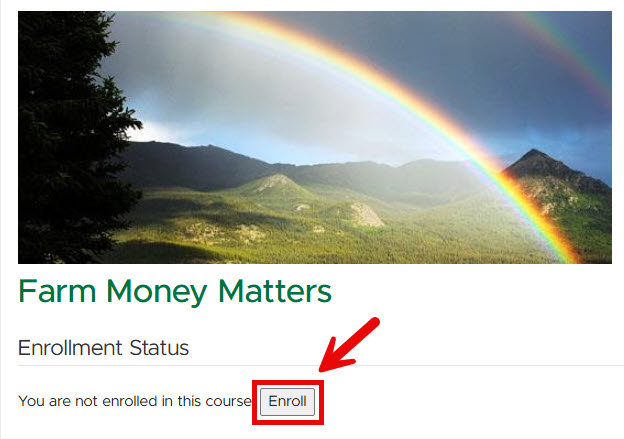
You may receive a message saying that your account is not active yet. This is normal - please wait 10-15 minutes and try again. Once you enroll, the system will show you a live link with the text “Course home page” to go directly to the course for the first time.
STEP #3: To go back to the course in the future after closing it the first time, go to https://d2l.msu.edu or click on the button below and select the login button and login with your email and password. You will see a list of all the courses you are enrolled in (there may be just one!). Click on the title of this course.
More Information
For more information, please contact Florencia Colella at colellaf@msu.edu.
Technical Assistance
For technical support, please contact the Michigan State University IT Service Desk Monday through Friday, from 7:00 AM to 7:00 PM (Eastern Time), on all days the University is open.
- Local: (517) 432-6200
- Toll Free: (844) 678-6200
Frequently Asked Questions
What is my username/NETID?
Your username is the email address you used to create your account during registration (you use the same email address/password for registering and for taking the course).
What URL do I go to for logging into the course?
Go to: https://d2l.msu.edu/. You will see the Michigan State University at the top of the page. Login with the email address and password you set during the registration process.
I received a “not authenticated” response when trying to login – what do I do?
A “not authenticated” message is typically an issue with a password not being entered correctly.
I forgot my password – where can I reset it?
If you need to reset your password at any time go to https://auth.msu.edu/ and select the option for "Need help Signing in."

 Print
Print Email
Email