Sharing Your Outlook Calendar
 Print
Print Email
EmailInstructions on how to share your calendar with other ANR users in Outlook.
- Open Outlook.
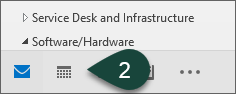
- Select the Calendar icon at the bottom of the screen.
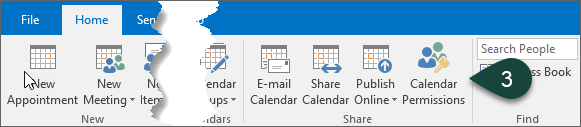
- Select Calendar Permissions from the Share Section of the Home Ribbon.
- Select Add.
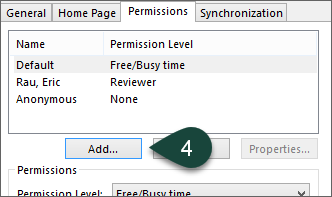
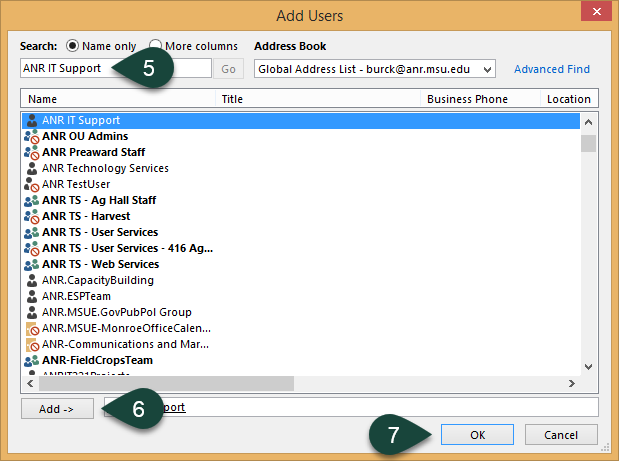
- Enter the last name of the ANR User with whom you wish to share your calendar.
- Double-click the User's Name or select Add.
- Select Ok.
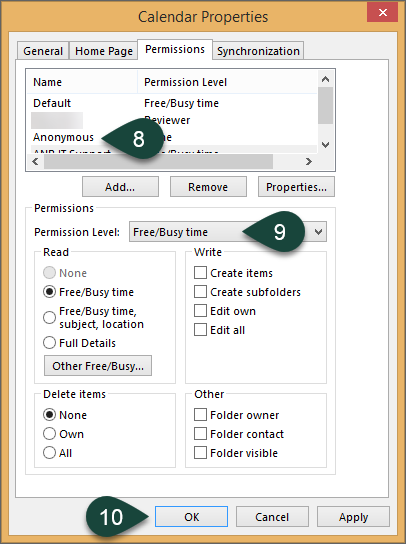
- Select the User's Name.
- Select the Permission Level you wish the use from the drop-down menu.
- Select Apply or Ok.
Did you find this article useful?
You Might Also Be Interested In
-
In the Field: Jenn Phillips
Published on July 6, 2018
-
Employee Antivirus Perk
Published on September 18, 2023
-
Sending from an Alternate Email Address in Spartan Mail Online (Office 365)
Published on March 31, 2021


-
Mapping a Network Drive (Mac)
Published on June 4, 2020
-
Setting the Default Calendar on Apple Devices (Office 365)
Published on April 22, 2021
-
Sending from an Alternate Email Address in Outlook
Published on March 31, 2021