


Business Cards
The fronts of all MSU Extension business cards include the following brand elements and information (see Figure 1):
- MSU seal
- MSU Extension wordmark
- Employee information:
- Name (in bold)
- Enter your pronouns. This is optional. If you do not want to add your pronouns, this line will not appear on your business card.
- Job title
- Second title line is reserved for educators who hold two titles. Meaning 50% of their time is for one title while the other 50% is for another title different from the first title.
- Building name (optional)
- Office address
- Office phone number
- Cell phone number (optional)
- Email address
- URL of the MSU Extension website (msue.msu.edu)
- URL of the MSU Extension Bookstore (shop.msu.edu, optional)
- Sample General Educator Titles
- 4-H Program Coordinator
- Administrative Assistant
- Associate Director, Agriculture and Agribusiness
- Associate Director, Children and Youth
- Associate Director, Community Food and Environment
- Associate Director, Health and Nutrition
- Associate District Director
- Associate Program Leader
- Communications Coordinator
- Communications Manager
- Coordinator, Events
- Data Systems Manager
- Director, Agriculture and Agribusiness
- Director, Children and Youth
- Director, Community Food and Environment
- Director, Health and Nutrition
- District Director
- District Support
- Educator
- Educational Media Coordinator
- Evaluation Specialist
- Fiscal Officer
- Marketing Specialist
- Program Assistant
- Program Associate
- Program Instructor
If you choose to use the word "educator" after your title, place the word "educator" after your title.
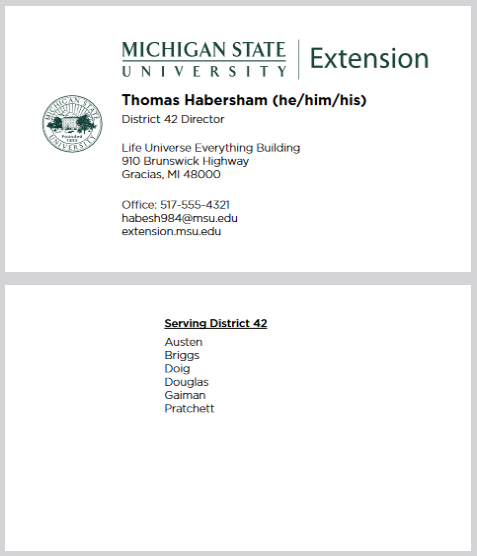
The backs of all cards except for those of district directors, or DDs, are blank. The backs of DDs’ cards list their district numbers and the counties in their districts.
Figure 1: Sample business card format for all MSU Extension staff. The cards of district directors also have text on the back.

Figure 2: Sample business card format for MSU Extension district directors. The top image shows the card front, while the bottom image shows the card back.
Ordering Business Cards
To help maintain a consistent look and feel across the organization, all MSU Extension business cards must be ordered through the dedicated MSU Extension business card website.
The site accepts payment by MSU purchasing cards (also known as p-cards).
How to Order Business Cards
1. Go to https://msue.w2pshop.com and log in using the following information:
- Username: msue-user
- Password: orders!!
2. On the Order Menu page, select:
- MSUE - Faculty and Staff MSUE1
3. Enter your contact information, including:
- Name
- Pronouns (optional)
- Title
- Address
- Phone numbers(s)
- Email username only (for example: Smithj)
- Email Suffix (select from the drop-down menu)
- Web address (select from the drop-down menu)
- Complete all required fields to populate your business card template. Keep the following in mind:
- Required fields – Required fields appear in red.
- Web address – Choose one.
- Click Preview to review your business card. If changes are needed, update the appropriate fields and click Preview again.
- Important: This is your final opportunity to proof your business card. The preview reflects exactly what will be printed. Any errors remaining after approval are your responsibility.
4. Click I Accept the proof. Select the desired business card quantity from the drop-down menu.
5. Click Add to Cart.
6. Click Checkout. Review the order summary, then click Continue.
7. Enter your shipping information and click Continue. The shipping method is preselected as USPS. Click Continue.
10. There is an opportunity to add Notes. There is also an opportunity to enter your Email Address. This email address will be used to send you the invoice for your order.
11. Click to Confirm and Submit. A confirmation page will display your order conformation number. You will also receive an email from GO ePower containing your order number along with a link to submit payment for your order.
 Print
Print Email
Email